Context
In an attempt to alleviate longstanding confusion around which Atlassian apps should be used for what purpose and when, the product organization began grouping apps into bundles called “collections.” Teamwork Collection (TWC) was the first one to be announced, consisting of Atlassian’s core collaboration apps: Jira, Confluence, and Loom. For its launch, the central Growth team owned the onboarding experience, which they wanted to live in Atlassian Home — the app squarely positioned as the “hub” between all Atlassian apps.
Business needs
Growth needed a launch onboarding for the new bundle, anchored in Atlassian Home. But the existing TWC content strategy was written for buyers, admins, and decision makers — so the content produced so far leaned heavily on marketing, since TWC was largely a pricing-and-packaging change.
User needs
The people actually being onboarded were end users simply gaining access to new apps. Net-new users were overwhelmed by unfamiliar tooling; existing users were resistant to yet another change. Neither needed a sales pitch — they needed relevant, useful orientation to get working.
Approach
At the peak of my time managing 4 separate product areas as the sole content designer on the team, I was unexpectedly made the content lead on this Growth project. It was a joint effort between Atlassian Home (one of my 4 product areas) and the Growth team, and I was originally meant to support a content designer from Growth. A couple of months in, design leadership asked me to take over and lead content design for the onboarding on my own.
I never got the full story about what happened, nor did I really seek it out. All my manager told me was that the content just wasn’t getting to where we needed it to be. If I had to guess, it was because a lot of what had been written so far leaned heavily into marketing — which made sense, because the overarching content strategy for TWC was predominantly sales-focused. And that was ultimately the problem: the existing content strategy was written for buyers, not end users. We needed to focus the onboarding away from the marketing and actually deliver content relevant to the people getting these apps for the first time.
It’s never easy taking over a project mid-stream, but it did give me the chance to build a fresh content strategy — which is exactly what this project needed.
The end(user)game strategy
The first thing I did was write a new content strategy for this particular project. Since TWC was mostly a pricing and packaging change, there hadn’t been much need for an end-user onboarding strategy — access to apps was the only thing really changing. I centered the new strategy around the “new tool access” message.
One thing I advocated for in particular was avoiding mention of “Teamwork Collection” in both the onboarding and general end-user experience. The name of the collection made sense for the buyer personas, but for users gaining access to new apps, the name of the bundle that their boss’s boss’s boss’s boss bought would at best be trivial and at worst confusing. The actual end users don’t need to understand what exactly TWC is — only that they have access to new Atlassian tools.
I built the strategy around two key audience segments:
Net new Atlassian users
No current Atlassian access, getting access to all TWC + platform apps.
- Assumptions
A new employee or an existing employee gaining access to Atlassian for the first time. - Psychographics
Overwhelmed, trying to figure out new tooling and team processes. - Primary goal
Getting set up with TWC apps as quickly as possible. - Target message
Clear tool definitions to get them up and running faster.
Existing Atlassian users
Currently uses at least one Atlassian app, and is now gaining all/remaining TWC apps.
- Assumptions
A regular user of an existing app, familiar with interactions and standards. - Psychographics
Annoyed, resistant to change/new tooling, may see onboarding as a nuisance. - Primary goal
Dismiss any intrusive messages and get on with their work. - Target message
Their current tools work better with the new ones.
My work
I led and delivered all the content for this project, contributing back to the overall TWC content strategy along the way. What I owned end to end:
- End-user content strategy, contributed back to the overall content strategy for TWC.
- Email content to notify users of app access.
- UI copy for the entire flows.
- Content variants across email and modal content (20+ modal variants condensed to 6 to alleviate engineering load).
- Onboarding spotlights on Home, plus app-specific onboarding for Goals, Projects, and Teams apps (other platform apps I was responsible for).
- Script for the onboarding hero video.
Modal overwhelming
One of the key parts of the onboarding experience was the modal, which would display either the first time a user lands in Home after gaining TWC access or after clicking the link in the email. This would potentially be their first in-app experience with their new apps, and we wanted to target the modal content to the user’s exact circumstances as much as possible. But to hit the granularity we wanted would have meant over 20 modal variants — to which the lead engineer said, “No.”
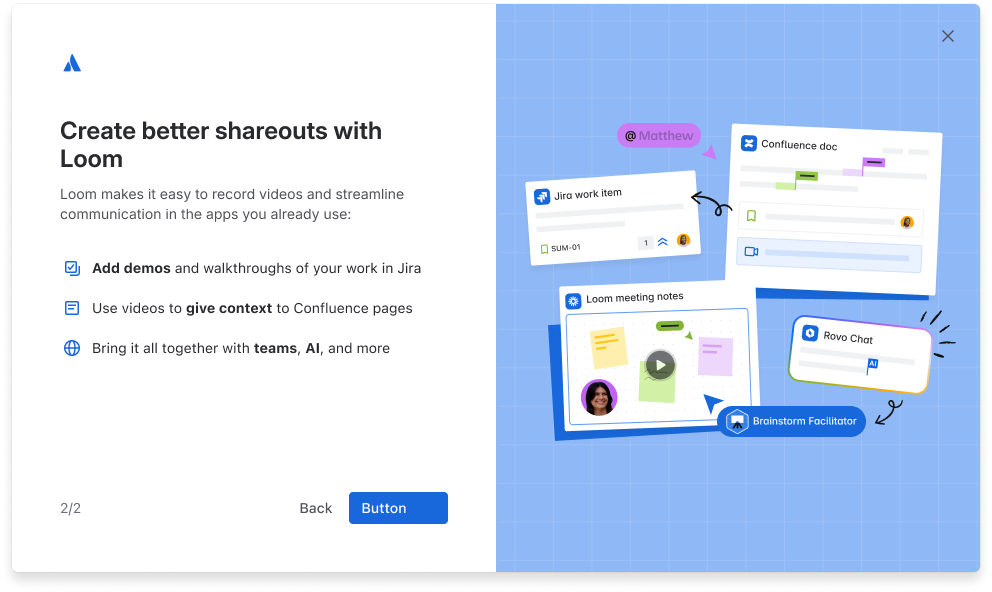
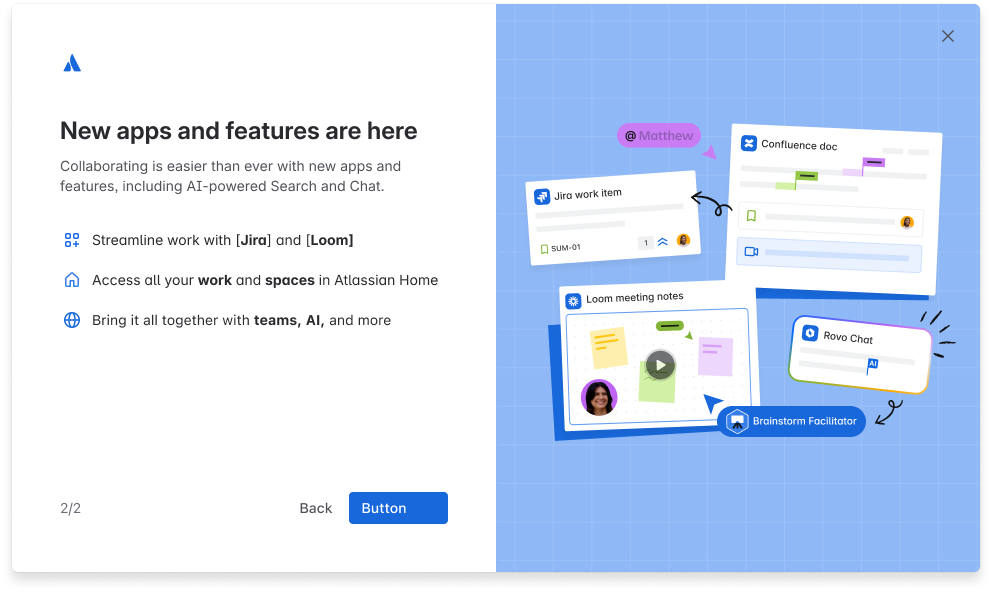
Instead, I made it a content problem and asked, “How can I consolidate some of these user circumstances into similar groupings with slightly more generalized content?” Through ✨content magic✨ (which was actually just painstaking stress-testing and plugging in minute changes across variants), I was able to get the number of variants down to 6:
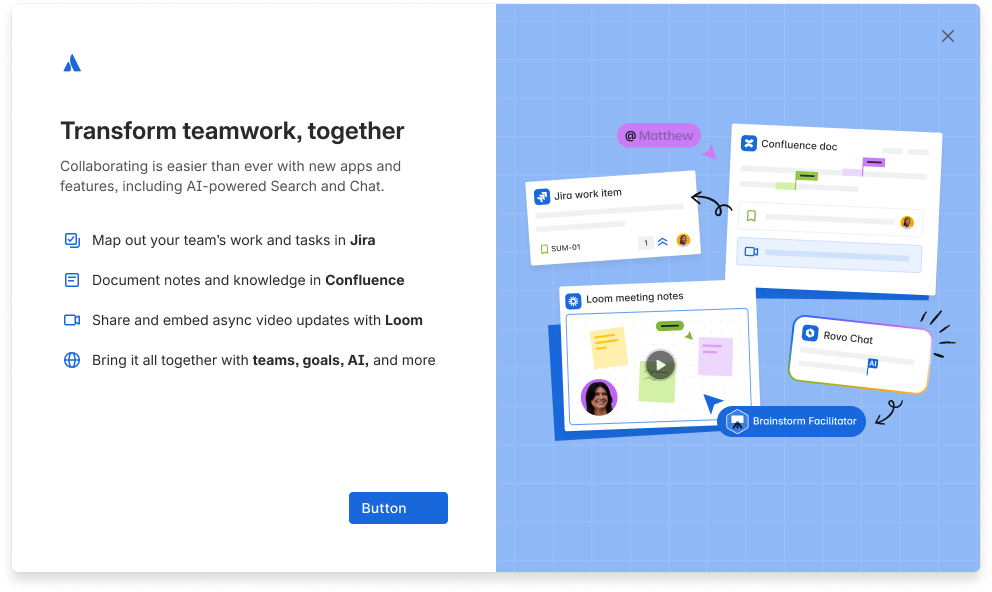
- New Atlassian users
- Access to Jira, Confluence, and Loom
- Access to Goals and Projects
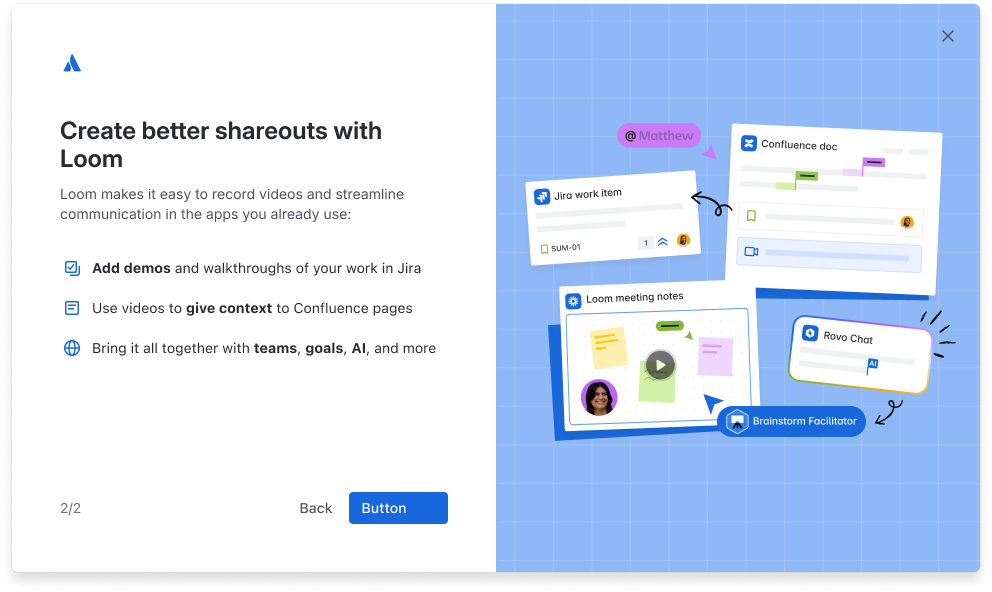
- Existing Atlassian users/admins
- Currently has Jira and Confluence, gaining access to Loom
- Access to Goals and Projects
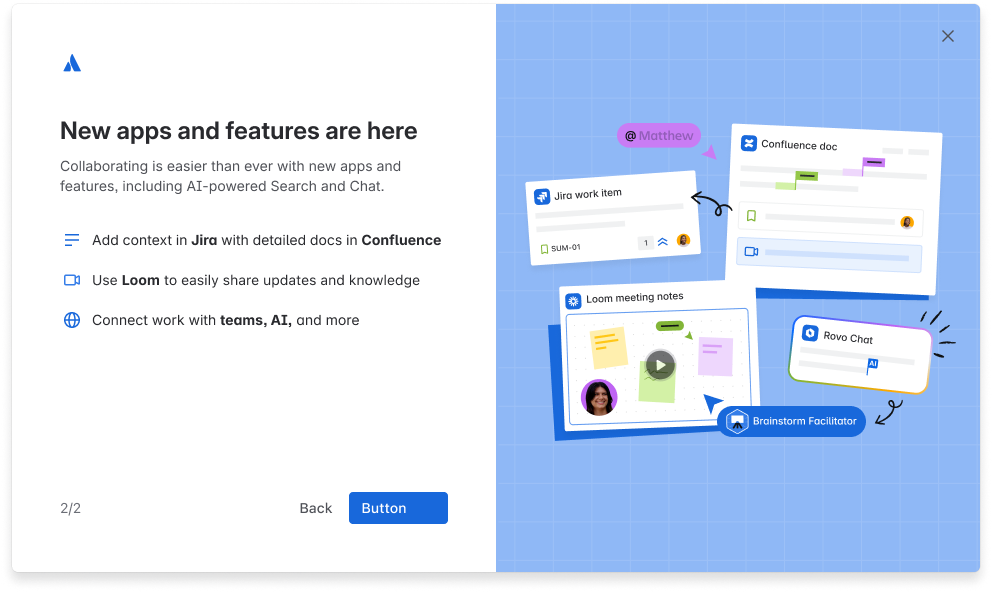
- Existing Atlassian users/admins
- Currently has one of the TWC apps and gaining access to the rest
- Works whether they have Goals and Projects access or not
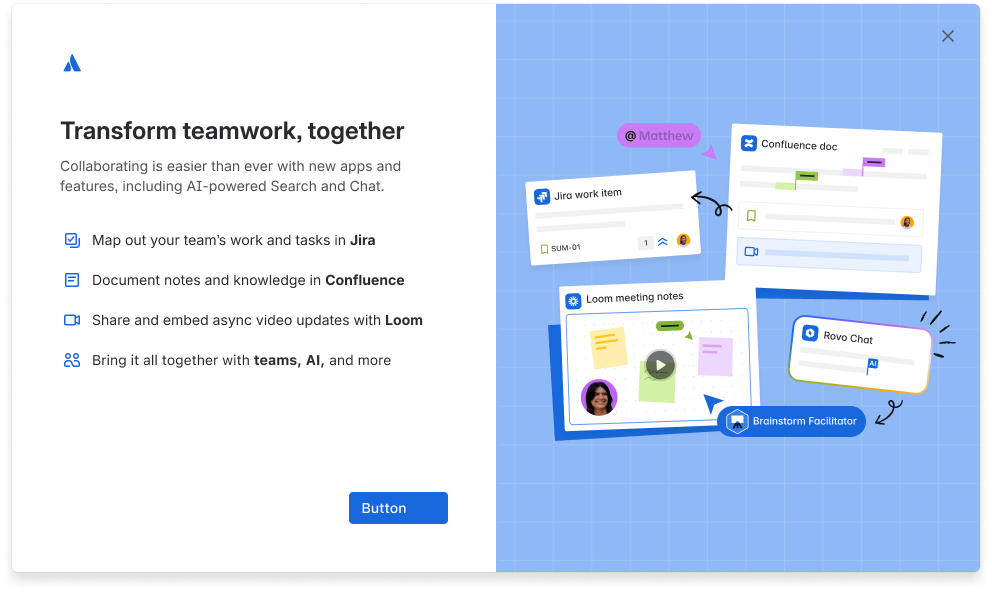
- New Atlassian users
- Access to Jira, Confluence, and Loom
- No access to Goals and Projects
- Existing Atlassian users/admins
- Currently has Jira and Confluence, gaining access to Loom
- No access to Goals and Projects
- Existing Atlassian users/admins
- Currently has one of the TWC apps and gaining access to one other app (2/3)
- Works whether they have Goals and Projects access or not
Our work on this modal also established a new pattern for spotlight modals, replacing the old one in the design system with this 2-column format with more options for scalability. While my two product design counterparts created the overall design spec and guidelines, I wrote the guidance for content on the modal, including character counts, content suggestions, and do’s/don’ts.
HubSpot(lights)
With the spotlights, we wanted them to be fairly straightforward without treading the same ground as the modal before it. Since it’s onboarding for a bundle of apps as well, the spotlights served to orient the user on the core purpose of Atlassian Home, plus the platform components that they would be able to access from any app. The second spotlight in particular highlights the primary way users can navigate between the apps they just heard about in the modal and any other Atlassian apps they have access to.
The deck of onboarding cards
Another prominent feature of the onboarding was a series of cards outlining individual app/experience onboarding and tasks they could complete as part of exploring their new apps:
In order to align with the aspect of “clear tool definitions,” the bolded headline of each card needed to explain the core action/function of an app in exactly one line. I landed on the format of [verb] [object] with [app] plus a short body to describe the core benefit.
Getting started
See how it all works together
Not sure where to start? Find out how your apps can streamline your work.
Watch video
Plan out tasks with Jira
Create project tasks to begin managing your project.
Try Jira
Write docs with Confluence
Create a knowledge bank, available to everyone in your team.
Try Confluence
Share updates with Loom
Share async video updates and reduce meetings for all.
Try Loom
Get help fast with Chat
Get answers to your questions and work through your tasks faster.
Try Chat
Automate work with Studio
Build custom AI agents, automations, and more without needing to code.
Try Studio
Find more with Search
Power up your searches with AI and make sure you are up to date.
Try Search
Track progress with goals
Align your work with goals to make sure you are on track.
Try Goals
Collaborate with teams
Collaborate with more teams and unlock the power of your teammates.
Try TeamsFinal deliverables: the onboarding hero video
You might’ve noticed in the Home screens above that one of the onboarding cards mentions a video. The thought, in our early planning, was that we would plug in whatever standard “What is Teamwork Collection?” type video to help users understand. The only problem was that existing assets were also very heavily marketing focused and weren’t actively helpful for end users.
For the onboarding, we wanted something closer to a demo that shows why these apps are all better together. While brand and creative would be creating the video itself, I was tasked with writing the script to best show off each app, plus platform apps and Rovo (Atlassian’s AI solution) — all in under 2 minutes.
I wrote several drafts and iterations based on stakeholder feedback, partnering with both the lead TWC content designer and a copywriter from the creative/brand team to align with Atlassian’s brand voice. We did have to include a mention of TWC, since the caveat was that — while it was made for the onboarding — it would need flexibility to be used in other contexts. So what we ended up with had to work well for all audiences, and became a nice blend of marketing and user-focused content.
Results & impact
This was a launch-onboarding content system rather than an experiment, so the impact reads less as a single metric and more as what shipped and what it unblocked:
- A content strategy reframed for end users. I reset the onboarding away from the buyer- and sales-focused messaging it had inherited, centering it on a “new tool access” message and deliberately dropping the “Teamwork Collection” name from the end-user experience.
- 20+ modal variants down to 6. By solving the targeting problem with content rather than engineering, I cut the modal matrix to a build the lead engineer could actually ship — while still covering the segments that mattered.
- A new, scalable spotlight-modal pattern. The work replaced the design system’s old benefits-modal with a 2-column format built to scale, and I authored its content guidance — character counts, suggestions, and do’s/don’ts — for future teams to reuse.
- A full onboarding system, delivered for launch. Modals, Home spotlights, the “Getting started” card deck, notification emails, and the hero video script all shipped under one consistent, end-user voice.
Taking over a project mid-stream is never comfortable, but it turned into the clearest argument I’ve made for separating end-user content from marketing — and a reminder that a content designer’s leverage often shows up as a scoping decision (20 → 6) long before it shows up as a single line of copy.